

What device actions are available?
Device actions are the changes you can make to a single device. Some only change its record in deeploi, others are sent to the device itself.
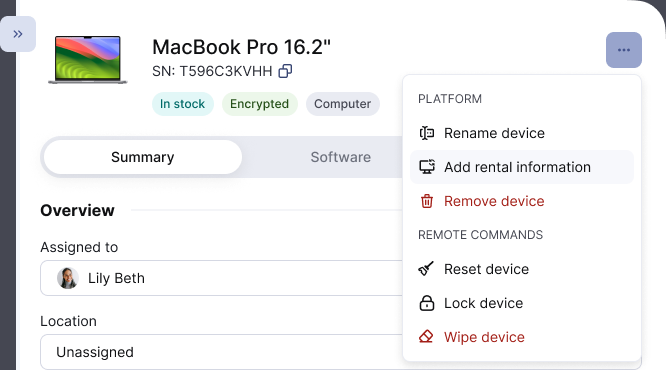
To act on a device, go to Inventory → Devices, click the device, then click the three-dot menu at the top of its detail panel. The menu has two sections: Platform and Remote Commands.
What can I change in deeploi?
Actions under Platform change the device record in your inventory. Nothing is sent to the device.
| Action | What it does |
|---|---|
| Rename device | Changes the name shown in deeploi. The device itself keeps its own name. |
| Add rental information | Adds rental details for a device deeploi did not order. Only shown for those devices. See When Your Device Rentals End. |
| Remove device | Opens a choice between Archive and Delete device. See Should I archive or delete a device? |
| Unarchive device | Makes an archived device active again. Only shown for archived devices, where Remove device is replaced by Delete device. |
You change the assigned employee, location, and notes in the Summary tab of the same panel. Without an assigned employee, no software from the employee's bundle installs on the device.
What can I send to the device?
Actions under Remote Commands are sent to the device itself. Most of them run the next time the device is online.
| Action | What it does |
|---|---|
| Show encryption key | Shows the disk encryption key so the employee can sign in if they forgot their password. |
| Reset device | Erases the device and resets it to factory settings, ready for a new employee. See How do I reset a device? |
| Lock device | Locks the device so nobody can use it until you unlock it. Data stays on the device. Macs and Windows PCs only. |
| Wipe device | Erases all data for emergencies like loss or theft. On Windows, the device may not start again afterwards. |
Not sure whether to wipe, lock, or reset? See Should I wipe, lock, or reset a device?
Remote commands only appear for devices that are connected to deeploi. Which ones you see depends on the device's operating system.
Can I delete several devices at once?
Yes. In the device list, select the checkbox next to each device, then click Delete selected devices. Type delete to confirm. Deleting many devices can take a few minutes, and you can leave the page in the meantime. Archiving several devices at once is not supported.